PENUP – Drawing-sharing SNS
Samsung Electronics Co., Ltd.Art & Design
4.511.77K Reviews
- Version
- Varies With Device
- Installs
- 100.00M
- Age Rating
- Teen
Screenshots
Our Review of PENUP – Drawing-sharing SNS
 Analysis by Appyee
I think the best way to decide whether PENUP belongs on your phone is to ask what you want from a drawing app. If you mainly want a quiet canvas for polished work, a social feed may feel like extra noise. If you like seeing how other people approach a prompt, sharing a sketch, and getting a nudge to draw regularly, PENUP has a more appealing mix. I find its strongest idea is not any single brush, but the connection between making art and seeing what a community does with it.
A drawing app with a social centre
PENUP is a free art and design app from Samsung Electronics Co., Ltd., built around drawings and the people who make them. It has a 4.5 average from around 220,000 ratings, and it has passed 100 million installs. Those figures suggest it has reached well beyond a small circle of specialist illustrators, though popularity alone does not tell you whether its style suits your own practice. Its Teen age rating is also worth noting if you are choosing apps for a younger artist.
For me, its appeal is easiest to understand as a middle ground. A conventional drawing tool puts the canvas first and leaves discovery elsewhere; a general social network makes artwork compete with everything else in the feed. PENUP keeps drawings at the centre, so browsing can turn into a practical source of ideas rather than an unrelated break. That makes it especially approachable for hobbyists who want to draw more often without treating every sketch as a portfolio piece.
Choose it for momentum, not only for tools
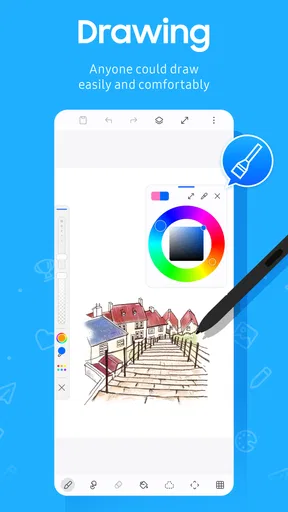
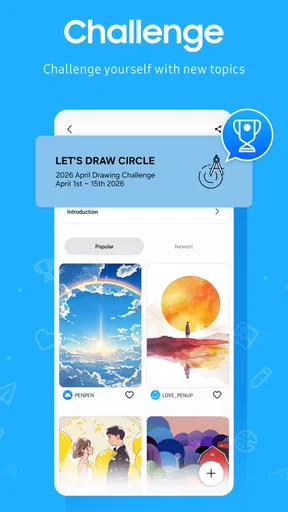
The app’s drawing tools are useful for making work inside the same place where you can share it. I would treat that convenience as a real advantage for quick studies, small experiments, and prompt-based sketches. A themed challenge can help when you have time to draw but no subject in mind: rather than waiting for inspiration, you can respond to a shared idea and then look at the different interpretations around it. The trade-off is that a prompt can steer your attention, so it is less suited to a session where you want complete freedom or a carefully planned professional workflow.
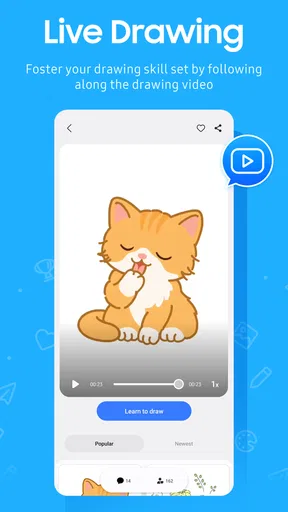
One useful habit is to browse a challenge before starting, then leave the feed and make your own version without trying to imitate the first image that catches your eye. Looking at several interpretations afterward is a better way to learn how artists solve the same visual problem. I also like the option of watching live drawing sessions when I want to observe process rather than just inspect a finished image. It is a different kind of learning: you can notice the order in which someone builds a drawing, although watching is not the same as receiving a structured lesson.
In an ordinary week, I can imagine opening PENUP during a short break, picking a prompt, and making a rough sketch before returning to it later. The low-pressure goal matters. If I expect every upload to be my best work, I am more likely to postpone drawing; if I treat a challenge as a small exercise, it can make starting easier. The social side also gives that exercise a destination, but I would share only work I am comfortable showing and keep personal material out of public-facing posts.
What is PENUP?
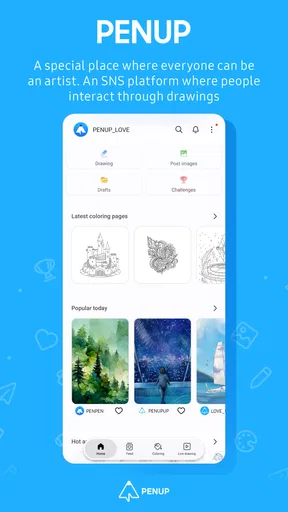
PENUP is more than just your average drawing app. It’s a social networking service where artists from all over the globe share their creations. Imagine Instagram, but for digital drawing enthusiasts. You’ve got a community of like-minded people right at your fingertips, ready to inspire and be inspired. It’s available on both Android and iOS, making it super accessible for everyone.
Getting Started with PENUP
First things first, let’s talk about the user interface. It’s clean, intuitive, and pretty straightforward. As soon as you open the app, you’re greeted with a feed of stunning artwork from various artists. You can easily navigate through different sections like popular drawings, new uploads, and challenges. It’s like stepping into an art gallery where you can linger as long as you want.
Setting up an account is a breeze. You can sign up using your email or simply log in with your existing Google or Samsung account. Once you’re in, it’s time to explore!
Create Your Masterpiece
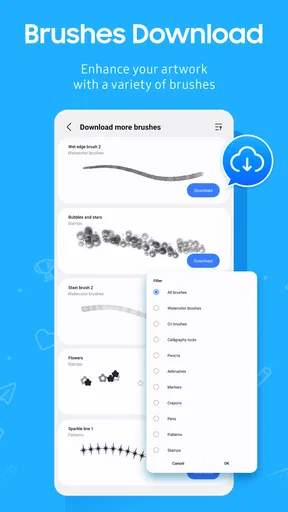
Now, let’s get to the fun part—creating art. The app offers a robust set of tools for drawing. You’ve got a variety of brushes, colors, and effects at your disposal. The touch responsiveness is spot-on, making it feel almost like you’re drawing on paper. Whether you’re a beginner or a seasoned artist, there’s something here for everyone.
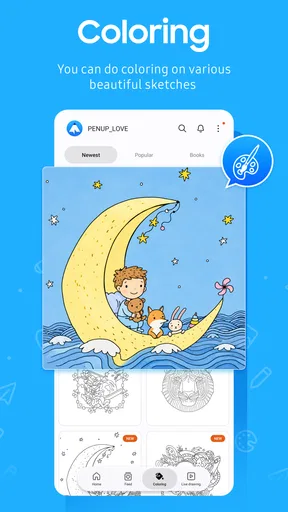
One of the coolest features is the ability to participate in challenges. These are themed drawing prompts that encourage you to create something new. It’s a fantastic way to push your creative boundaries and see how others interpret the same theme. Plus, it’s super satisfying to complete a challenge and see your work alongside others.
Engage with the Community
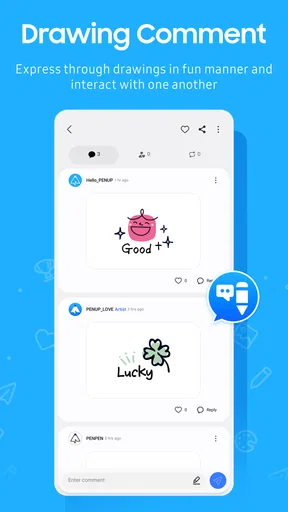
What sets PENUP apart is its community aspect. You can follow your favorite artists, comment on their work, and even send them messages. It’s like having a digital art club where you can exchange tips, techniques, and encouragement. The community is generally very supportive, which is always a plus.
Another neat feature is the ability to watch live drawing sessions. You can see artists create in real-time, which is not only mesmerizing but educational. It’s a great way to pick up new techniques and get inspired.
How it compares with other ways to draw
Compared with a dedicated illustration program, PENUP’s advantage is the path from sketch to sharing: you can make something and place it in an art-focused community without turning the process into a separate publishing task. A specialist canvas may be a better fit if your priority is a highly controlled production workflow, detailed project management, or a particular professional toolset. I would choose PENUP for practice and discovery, not assume that its social focus replaces every other art program.
Against a general photo-and-video social network, the narrower subject matter is a plus when I want to see drawings rather than scroll past unrelated posts. The flip side is that community feedback is not the same as private critique from a teacher or a peer who knows what I am trying to improve. If I need precise guidance on anatomy, color, or composition, I would use the app as a place to share and observe, while seeking more targeted instruction elsewhere.
There is also a useful distinction between drawing directly in the app and using it mainly as a gallery. If I already have a preferred drawing setup, I can still value PENUP for browsing prompts and artists, but moving between tools and a social destination adds a step. Someone who wants one app to handle a highly specific end-to-end art process may find that friction more important than the community benefits.
Small choices that make the experience better
I would avoid following too many artists immediately. A smaller, deliberately chosen feed makes it easier to notice recurring techniques and styles, rather than turning browsing into an endless stream. When I find a piece I like, I try to identify one concrete choice—such as how the artist simplified a shape or handled contrast—instead of only thinking that the finished image looks good. That turns casual scrolling into a tiny study exercise.
Challenges work best for me when I set a modest limit before starting: one idea, one short session, and no pressure to make a finished illustration. That keeps the prompt from becoming an obligation. If I want to develop a sketch into a more considered piece, I can use the challenge as a starting point and decide separately whether to continue elsewhere. The useful trade-off is that a shared theme offers direction, but the artist still has to set their own boundaries around time and ambition.
Live drawing is worth approaching with a question in mind. Rather than watching passively, I might focus on how the artist begins, when they revise a mark, or how they move from broad shapes to detail. I would not treat a single session as a complete tutorial; its value is seeing choices unfold in context. That makes it a low-pressure source of observation, especially for someone who learns by watching, while a step-by-step course remains a better choice for systematic instruction.
What to expect before you settle in
The social features are part of the product, not a side option, so the experience will feel different depending on whether you want to participate. Browsing alone can still be enjoyable, but following artists, responding to work, and posting your own drawings are what give the community its ongoing rhythm. If you prefer to keep creative work entirely private, or you dislike feeds and public interaction, a standalone drawing app may feel calmer and more direct.
Likewise, I would not pick PENUP solely because I need a precise tool for a demanding commission. The attraction here is the combination of drawing, prompts, and community. A professional workflow may call for a different app or a separate process, while a beginner who wants encouragement and a reason to practise may find the social structure helpful. There is no need to make every sketch public; you can decide how much of the community experience you want to take part in.
For someone wondering whether the app is worth trying without changing their whole routine, I would start with one challenge and a brief browse through the work around it. That gives a fair sense of both sides: whether the drawing experience feels comfortable and whether seeing other artists adds motivation. If the feed becomes a distraction, use the app more selectively; if the prompts help you begin, make them a regular exercise rather than a measure of your ability.
Final Thoughts
After spending some quality time with PENUP, I can confidently say it’s a must-have for anyone who loves art. Whether you’re looking to improve your skills, find inspiration, or just enjoy browsing beautiful art, this app has got you covered. Plus, the community vibe makes it more than just an app—it’s a place to connect and grow as an artist.
If you haven’t already, give PENUP a try. It’s a delightful blend of creativity and community that’s hard to resist. So grab your stylus, dive in, and start creating!
Who I would recommend it to
I would recommend it most to casual illustrators, curious beginners, and people who already enjoy sharing visual work. It can also suit a returning artist who wants an easy prompt to restart a habit, or someone who likes learning by looking closely at other people’s process. You do not need to approach it as a serious portfolio platform for it to be useful; a small sketch made for the pleasure of making it is enough reason to open it.
I would be more cautious if you want a distraction-free workspace, detailed one-to-one instruction, or a tightly controlled professional pipeline. In those cases, the community may not compensate for the extra social layer, and a dedicated drawing tool or teaching resource may serve you better. My recommendation is simple: try PENUP if drawing feels more inviting when there is a prompt or a community nearby, and skip it if you want your art software to stay entirely private and task-focused.
Verdict
Strengths of PENUP – Drawing-sharing SNS
- User-friendly interface is easy to navigate.
- Wide variety of tools for creative expression.
- Strong community engagement and support.
- Regular challenges to inspire creativity.
- Free to use with no hidden charges.
Limitations of PENUP – Drawing-sharing SNS
- Limited advanced features for professional artists.
- Requires internet connection for full functionality.
- Occasional lag on older devices.
- Ads can be slightly intrusive at times.
- No offline drawing mode available.
Other Releases by Samsung Electronics Co., Ltd.
View All
Samsung Calendar
Productivity4.1

Samsung Browser
Communication3.6

Samsung Music
Music & Audio3.8

SmartThings
Lifestyle4.6
Similar Picks in This Category
View All
Canva: AI Photo & Video Editor
Canva4.8

Crafto
Kutumb App4.6

Sketchbook
Sketchbook4.1

ibis Paint X
ibis inc.4.5

Adobe Express: AI Photo, Video
Adobe4.6

PaperColor
Eyewind4.5
Frequently Asked Questions
What is PENUP and how does it work?
PENUP is a social networking app designed for artists and enthusiasts who love to draw and share their artwork. It allows users to create digital drawings using various tools and share them with a community of like-minded individuals. Users can participate in challenges, explore artwork from others, and receive feedback from the community.
Is PENUP free to use, and are there any in-app purchases?
PENUP is free to download and use, offering a wide range of features without any cost. However, some advanced tools and additional content may require in-app purchases. These optional purchases enhance the user experience but are not necessary for enjoying the app's core features.
Can I use PENUP without an internet connection?
PENUP requires an internet connection to access its social features, such as uploading your artwork, viewing others' creations, and participating in challenges. However, you can still create and save your drawings offline, but you'll need to be online to share them with the community.
What devices are compatible with PENUP?
PENUP is compatible with both Android and iOS devices. It is optimized for Samsung Galaxy devices, offering additional features like S Pen support. For the best experience, ensure that your device is running the latest operating system, although PENUP is designed to work on a wide range of hardware.
How can I ensure my privacy and security on PENUP?
PENUP values user privacy and security. You can control who views your content by adjusting your privacy settings within the app. Always use a strong, unique password for your account, and be cautious about sharing personal information. The app also offers reporting features to handle inappropriate content or behavior.
